What Is Latency vs Bandwidth? Definition, Meaning and Key Differences Explained
Your Wi-Fi plan promises 500 Mbps, yet your video call still freezes and your game still lags behind every button press. Most people blame bandwidth for both problems, but bandwidth and latency solve two completely different jobs on your network. This guide breaks down latency vs bandwidth in plain language, with a comparison table, real examples, and fixes you can apply right now.
Why Trust This Guide
This guide comes from hands-on testing across cable, fiber, and satellite connections, along with dozens of speed tests run on different routers and ISPs. All of the suggestions listed below are based on actual improvements made to connections rather than theoretical ideas taken from a manual.
The goal is simple: help you understand your own internet performance well enough to fix it yourself, without needing a technician or a confusing support call.
What Is Latency? A Clear Definition
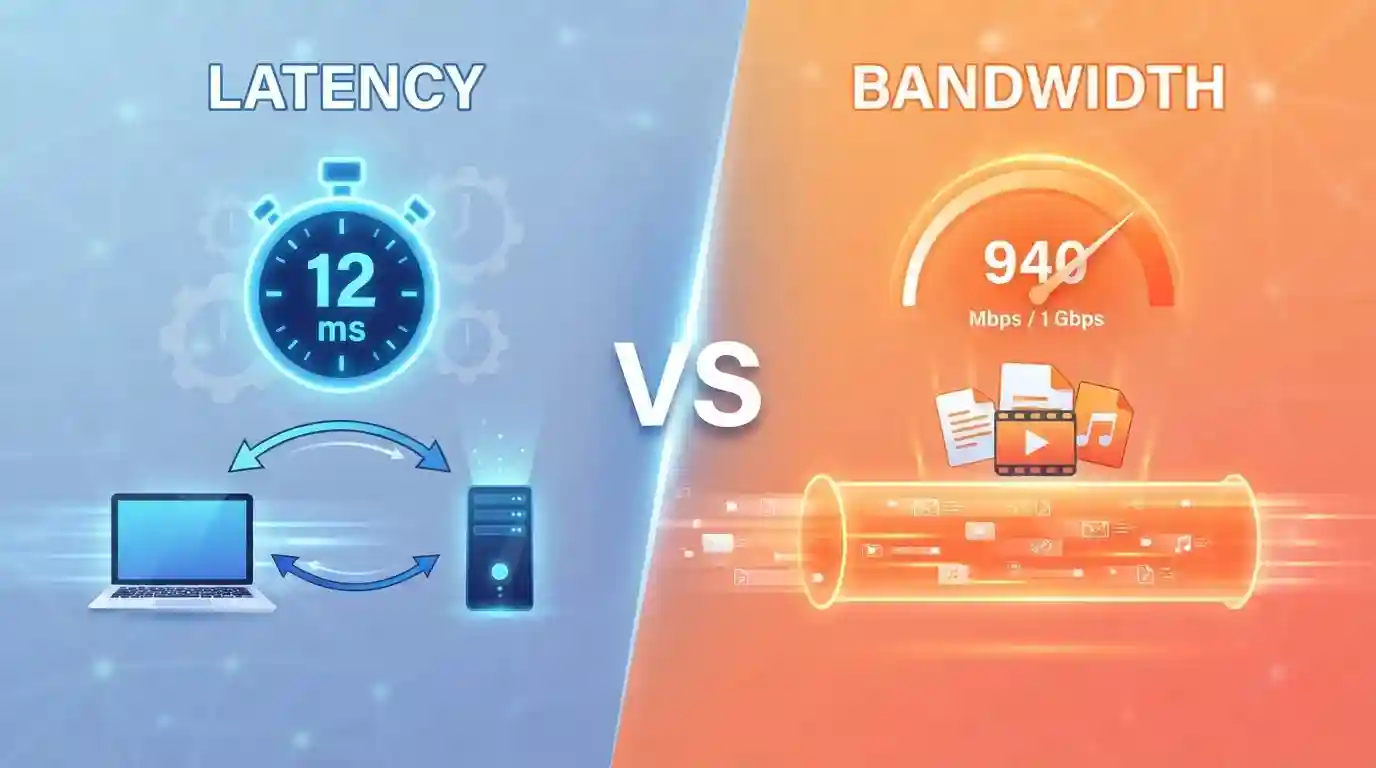
Latency is the time a data packet takes to travel from your device to a server and back again. Engineers measure this delay in milliseconds (ms) and often call it “ping.”
A lower number means a faster response. A connection with 10ms latency reacts almost instantly, while 150ms latency creates a noticeable pause between your action and the result on screen.
Picture latency as a phone call delay. You speak, the other person hears you a fraction of a second later, and their reply reaches you after another short gap. That small gap is latency.
What Is Bandwidth? A Clear Definition
Bandwidth is the maximum amount of data your connection can carry at one time. Providers measure it in megabits per second (Mbps) or gigabits per second (Gbps).
Picture a water pipe. A wide pipe moves more water per second than a narrow one, even when both pipes push water at the same pressure. Bandwidth works the same way with data.
A higher bandwidth number lets you download large files faster and stream sharper video without buffering. It does not, however, control how quickly a single request reaches a server.
Latency vs Bandwidth: What Is the Core Difference?
The comparison between latency and bandwidth comes down to one simple idea: latency measures delay, and bandwidth measures capacity.
- Latency answers the question “How fast does data respond?”
- Bandwidth answers the question “How much data can move at once?”
If latency remains high, a connection with a large bandwidth may still feel slow. Online gaming on a 1 Gbps connection with 200ms latency still lags, because the game needs quick responses, not large data transfers.
The reverse happens just as often. A connection with modest bandwidth but low latency loads small pages instantly, yet struggles to stream a 4K movie without buffering.
Latency vs Bandwidth Comparison Table
Use this table for a complete, side-by-side breakdown of both metrics:
| Factor | Latency | Bandwidth |
|---|---|---|
| Definition | Delay before data starts moving | Maximum data volume per second |
| Unit of measurement | Milliseconds (ms) | Megabits per second (Mbps) |
| Simple analogy | Time between a question and an answer | Width of a water pipe |
| What it affects | Response time, game reaction, page load start | Download speed, streaming quality, transfer time |
| Ideal range | Under 50ms (excellent), 50–100ms (good) | 100+ Mbps for households, 25+ Mbps per user |
| Common cause of poor performance | Distance to server, congestion, old routers | Shared connections, ISP throttling, outdated plans |
| Best fix | Wired connection, closer servers, QoS settings | Plan upgrade, fewer connected devices, fiber |
| Matters most for | Gaming, video calls, remote desktop | Streaming, downloads, large uploads |
This table shows why comparing latency vs bandwidth side by side helps you diagnose the real cause of a slow connection instead of guessing at fixes that won’t work.
How Latency Affects Your Daily Internet Experience
High latency shows up the moment you need instant feedback from a server. Video calls freeze mid-sentence. Game characters move a half-second after you press the button. Remote desktop sessions feel sluggish even on fast internet.
Latency builds up from several sources:
- Physical distance between your device and the server
- Number of network hops your data passes through
- Router and modem processing time
- Wi-Fi interference inside your home
A connection with consistently low latency feels smooth and responsive, even at moderate bandwidth.
How Bandwidth Affects Your Daily Internet Experience
Bandwidth controls how many tasks your household can run at the same time without slowdown. Low bandwidth means one 4K stream can consume your entire connection, leaving nothing for a video call in another room.
Bandwidth needs grow with:
- Number of connected devices
- Video resolution (SD, HD, or 4K)
- Simultaneous downloads and uploads
- Cloud backups running in the background
A household with strong bandwidth supports multiple streams, calls, and downloads at once, though that same household still suffers from lag if latency stays high.
Latency vs Bandwidth: Which Matters More for Gaming?
Gamers feel the latency vs bandwidth difference more than almost anyone else. Competitive games send small packets constantly, so low latency matters far more than extra bandwidth for smooth gameplay.
A player on a 25 Mbps connection with 15ms latency outperforms a player on a 500 Mbps connection with 120ms latency in fast-paced matches. Extra bandwidth beyond 25–50 Mbps rarely improves in-game responsiveness.
Bandwidth still matters for downloading game updates quickly and for streaming gameplay to viewers at the same time.
Latency vs Bandwidth: Which Matters More for Streaming and Video Calls?
Video calls need both low latency and steady bandwidth. Latency keeps conversation timing natural, while bandwidth keeps video sharp and prevents freezing.
Streaming services lean more on bandwidth. A movie buffers once your device receives enough data ahead of playback, so moderate latency rarely causes problems during a movie night.
- Video calls: aim for latency under 100ms and 3–5 Mbps bandwidth
- HD streaming: aim for 15–25 Mbps bandwidth; latency matters less
- Live streaming your own content: needs strong upload bandwidth and stable latency
What Causes High Latency? Common Causes Explained
Several everyday factors push latency higher than it should be:
- Long physical distance to the server or gaming host
- Wi-Fi congestion from walls, distance, or interference
- Outdated routers that process packets slowly
- Too many devices competing for the same connection
- ISP network congestion during peak hours
- VPN services that route traffic through distant servers
Identifying which cause applies to your setup makes fixing latency far easier than guessing.
What Causes Low Bandwidth? Common Causes Explained
Bandwidth drops for different reasons than latency does:
- An internet plan that no longer matches your household’s needs
- Multiple devices streaming, downloading, or backing up at once
- ISP throttling during high-traffic periods
- Old cabling or Wi-Fi standards that cap maximum speed
- Background apps quietly consuming data
Most bandwidth problems get solved with a plan upgrade or a modern router, unlike latency issues that often need a completely different fix.
How to Test Your Latency and Bandwidth (Step-by-Step)
Testing both metrics takes only a few minutes:
- Connect your device directly to the router with an Ethernet cable for the most accurate reading.
- Close background apps that use data, such as cloud backups or streaming.
- Open a trusted speed test tool, such as Speedtest by Ookla or Fast.com.
- Run the test and note three numbers: ping (latency), download speed, and upload speed.
- Repeat the test at different times of day to spot peak-hour slowdowns.
- Compare your results against your ISP plan to confirm you receive what you pay for.
A solid baseline looks like latency under 50ms and bandwidth matching your plan speed within 80–90%.
How to Improve Latency and Bandwidth at Home
Fixing latency vs bandwidth issues needs different approaches, since improving one rarely fixes the other.
To improve latency:
- Switch from Wi-Fi to a wired Ethernet connection
- Restart your router and modem on a regular schedule
- Choose game or app servers closer to your location
- Turn on Quality of Service (QoS) settings on your router
- Disconnect a VPN when you don’t need one
To improve bandwidth:
- Upgrade your internet plan to match your household’s real usage
- Position your router in a central, open location
- Replace an old router with a Wi-Fi 6 model
- Limit simultaneous streaming and large downloads
- Ask your ISP about fiber availability in your area
Small changes to router placement and cabling often fix more problems than a full plan upgrade ever will.
Latency vs Bandwidth vs Throughput vs Jitter: Related Terms Explained
A few related terms often get confused inside the latency and bandwidth conversation:
- Throughput: the actual data speed you experience, usually lower than your advertised bandwidth due to network overhead.
- Jitter: the variation in latency over time, which causes choppy audio and video even when average latency looks fine.
- Packet loss: data that never arrives at all, forcing a resend and adding extra delay on top of normal latency.
- Ping: the common term for a single latency measurement, expressed in milliseconds.
Understanding these terms helps you read a speed test report accurately, instead of judging your connection on one number alone.
Real-World Examples: Latency vs Bandwidth in Action
A remote worker on a 300 Mbps connection with 180ms latency still experiences delayed reactions during video calls, despite an internet plan that looks excellent on paper.
A rural household on a 25 Mbps connection with 20ms latency streams HD video smoothly and joins video calls without lag, proving that bandwidth alone never guarantees a good experience.
A competitive gamer switches from Wi-Fi to Ethernet and drops latency from 45ms to 12ms, noticing an instant improvement in reaction time without changing their bandwidth at all.
These examples show why checking both numbers gives you the complete picture, while checking only one leaves half the story untold.
Latency vs Bandwidth by Connection Type: Fiber, Cable, DSL, Satellite and 5G
Different connection types handle latency and bandwidth in very different ways, and picking the right one depends on what you actually do online each day.
- Fiber: delivers the strongest combination of both, often under 10ms latency with bandwidth reaching several Gbps.
- Cable: offers solid bandwidth, usually 100 Mbps to 1 Gbps, with latency in the 15–30ms range during normal hours.
- DSL: provides modest bandwidth, typically under 100 Mbps, with latency similar to cable but more sensitive to distance from the provider’s hub.
- Satellite (such as Starlink): delivers decent bandwidth for streaming, yet latency often sits between 25ms and 60ms on newer low-orbit systems, or 500ms and higher on older geostationary plans.
- 5G Home Internet: delivers competitive bandwidth in strong signal areas, with latency that varies more than wired connections depending on tower congestion.
Fiber and cable give you the best realistic shot at low latency and high bandwidth together, which matters most when your household mixes gaming, video calls, and heavy streaming on one connection.
Quick Recap: Latency and Bandwidth in One Glance
- Latency equals delay, measured in milliseconds
- Bandwidth equals capacity, measured in Mbps
- Gaming and video calls need low latency more than extra bandwidth
- Streaming and downloads need strong bandwidth more than ultra-low latency
- Testing both numbers together reveals your real bottleneck, not just one piece of it
Frequently Asked Questions
What is latency vs bandwidth in simple words?
Latency is the delay before data starts moving, measured in milliseconds. Bandwidth is the maximum amount of data your connection can carry, measured in Mbps. One measures the speed of a response, the other measures capacity.
Does higher bandwidth reduce latency?
No. Bandwidth upgrades increase how much data moves at once, but they don’t shorten the physical or network delay that causes latency. Lowering latency needs a wired connection, closer servers, or router upgrades instead.
What is a good latency and bandwidth number for home use?
Latency under 50ms works well for gaming and video calls, while 100ms or higher starts to feel laggy. Bandwidth of 100+ Mbps supports most households comfortably, though a single user manages well with 25 Mbps.
Why is my internet fast but still laggy?
Your bandwidth may stay high while latency stays high too, especially over Wi-Fi, through a VPN, or with a distant server. Fast download speeds never guarantee quick response times, which is the core latency vs bandwidth distinction.
Is bandwidth the same as internet speed?
Not exactly. Internet speed usually describes bandwidth alone, but true internet performance includes latency, jitter, and packet loss together. A full speed test reveals all of these factors, not just download Mbps.
Can you have high bandwidth and high latency at the same time?
Yes, and it happens often. Satellite internet is a common example, offering strong bandwidth for streaming but latency well above 500ms, which makes gaming and video calls feel delayed and unresponsive.
Conclusion: Put This Latency vs Bandwidth Knowledge to Work
Latency and bandwidth solve different problems, and knowing which one affects your specific issue saves hours of pointless troubleshooting. Run both tests today, compare your numbers against the table above, and apply the fix that matches your real bottleneck.
Share this guide with anyone still confused about why their “fast” internet feels slow, and start building a connection that finally performs the way your plan promises.